
Using Google’s products and services has always been fundamentally precarious—doing so gives the world’s largest advertising company a lot of juicy personal data. Google has long said it won’t use the sensitive data from products like Gmail, Drive, and Photos for ad personalization, but a change to the company’s privacy policy appears to dismantle that firewall.
On October 16, Google issued an update to its privacy policy, spotted by Android Authority. The ad personalization section used to include a clear limit on data from certain apps. “We don’t show you personalized ads based on your content from Drive, Gmail, or Photos,” the document said. Now, Google has updated it with the following language.
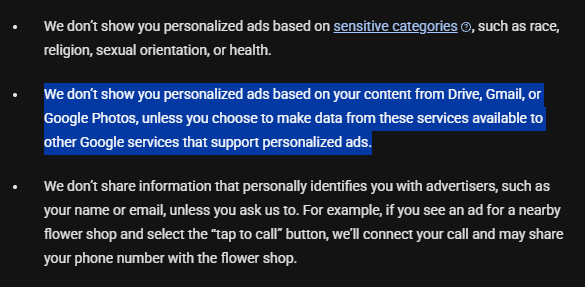
This equivocation opens the door to using data from apps like Gmail and Photos in ads when it’s shared with other Google services, and it just so happens Google has a mechanism for doing that, with Personal Intelligence. The company released Personal Intelligence in early 2026, allowing users to hand data from multiple apps to Google AI products. The idea is that the added context from your existing data will lead to better AI answers, but it’s also proving to be a privacy minefield.
Personal Intelligence connects your data to the Gemini app but also to features like AI Mode search. While the Gemini app does not currently have ads, you may see sponsored content in AI search tools. Google’s changes to the privacy policy appear to acknowledge that data shared with AI search via Personal Intelligence could, therefore, contribute to ad personalization.
According to Google, this clarification still doesn’t mean ads are “based directly” on your personal data. Here’s the company’s full statement:
“Connecting your apps is entirely opt-in. Ads will continue to be relevant to things like your query, the context of the response and your interests. Ads will not be based directly on your Gmail inbox or Photos library, and as always, sensitive information will not be used to tailor ads.”
Google’s statement is essentially a roundabout way of confirming that Workspace and Photos data may inform ads. If you interact with AI Mode while Personal Intelligence is enabled, there’s a chance that summaries and insights from your data will inform the answers you get. Because that same data is used for ad targeting, it’s accurate to say that your personal data is an element of ad targeting in AI search. The privacy policy now makes that clear.
A Google spokesperson tells Ars that its privacy clarification does not indicate a change in how it handles your data with respect to its advertising partners. It’s not scanning your entire inbox to enhance your advertising profile, and it’s not giving any of this data to third parties. But if you pipe personal data into an AI search tool, the ads it shows you could be based on that information.
The personalization trap
The core of the problem is that Google wants its products and services to talk to each other. Google sees that wealth of data as a key strength of its AI efforts. Some apps like Gmail are still given protected status in Google’s data handling, but there are now more avenues for that data to get out. The more data you share across Google’s ecosystem, the greater the risk to your privacy.
We’ve seen a similar exception in the way Google uses your AI interactions for model training. While Google says it doesn’t use personal data for AI training, it does use your inputs and the model outputs for that purpose. With Gemini integrated with so many services and connected to them via Personal Intelligence, those outputs may very well contain elements of your personal information. Google has said it tries to filter that content from the user activity controls, therefore keeping it out of training sets. However, it doesn’t promise it will always be successful.
Google is correct that Personal Intelligence is opt-in, but the company uses various prompts and pop-ups to entice users to turn it on without fully explaining the consequences. You may have turned it on without realizing.
If you want to ensure ads never use your personal data in this way, you’ll need to make sure Personal Intelligence is turned off. The easiest way is to access the Gemini settings for Personal Intelligence and disable the connected apps. These settings are also a few levels deep in your main Google account settings under Data & privacy > Personalization settings > Manage Personalized Recommendations in Search Services > Connected Content Apps. From there, you can disable connections to Workspace and Google Photos.